

Cua Driver has released Cua Perception, an on-device visual parsing extension that extracts clickable regions from custom-drawn desktop applications without calling cloud multimodal APIs. Running Microsoft OmniParser and PaddleOCR locally via ONNX Runtime on the CPU, the driver translates unmapped canvas pixels into discrete, typed candidate actions, binding every visual click to an expiring 60-second capture lease.
In modern computer-use benchmarks like OSWorld 2.0, the failure boundary of autonomous desktop agents rarely stems from high-level reasoning. Frontier foundation models—including OpenAI’s GPT-6 Astra and Anthropic’s Claude Opus 5.5—routinely formulate accurate plans across enterprise applications. Instead, workflows collapse during execution: floating-point coordinate drift, sub-pixel rounding errors on high-DPI displays, and race conditions caused by asynchronous interface transitions turn valid plans into misclicks.
The Canvas Black Hole: When Accessibility Trees Go Dark
Autonomous desktop agents prefer structured semantic metadata. Operating system accessibility APIs—UIAutomation on Windows, the Accessibility API on macOS, and AT-SPI on Linux—expose complete trees containing element labels, roles, hierarchy, and bounding boxes. Browser-based agents leverage the DOM in the same manner. When an accessibility tree is populated, an agent acts deterministically: it targets an element by identifier or semantic selector, dispatches the event, and verifies state changes without visual ambiguity.
Modern desktop software frequently bypasses native accessibility wrappers entirely. WebGL mapping dashboards, Flutter frontends, legacy Qt or WPF enterprise tools, Citrix and RDP remote virtual sessions, and custom HTML5 canvas renderers (such as Figma or Google Docs’ layout engine) present an opaque bitmap buffer to the host operating system. The accessibility hierarchy for these windows returns an empty response:
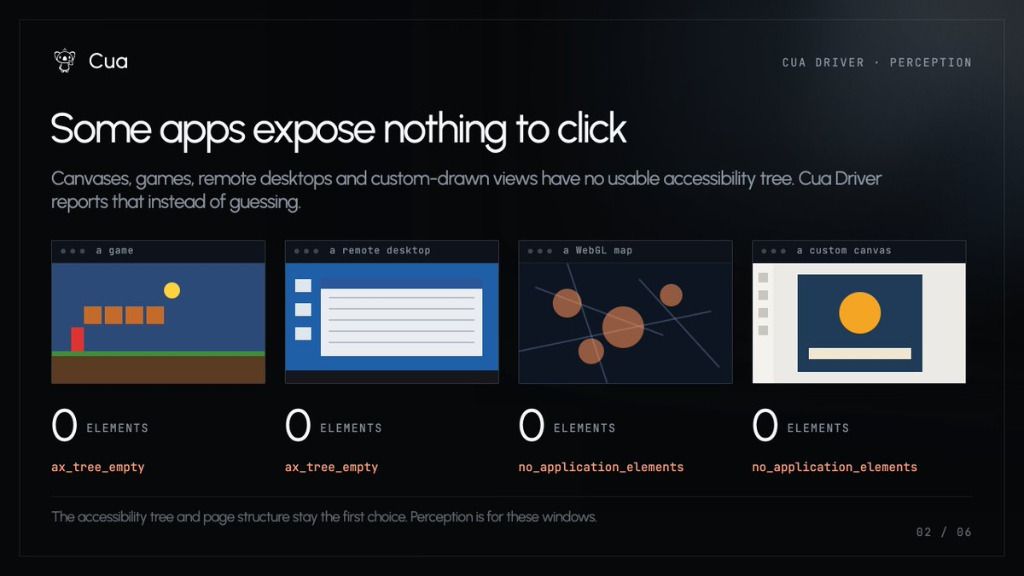
Returned across hardware-accelerated games, Citrix workspaces, and remote desktop clients where the OS accessibility daemon detects zero semantic nodes.
Returned on custom-drawn canvas elements, WebGL viewports, and custom web applications where DOM elements are collapsed into a single pixel surface.
Until now, agent runtimes handled this failure mode through unconstrained multimodal vision. When the tree was empty, the runtime captured a 4K frame, sent it across the public internet to a multimodal model, and prompted the model to emit raw coordinate floats (for example, {"action": "click", "coordinate": [842, 319]}). In practice, continuous coordinate prediction across hundreds of steps introduces cumulative failure boundaries that degrade agent reliability.
The Mathematical Flaw in Continuous Coordinate Pointing
Continuous coordinate prediction treats GUI interaction as an open-ended spatial regression task. For an agent completing multi-step enterprise workflows—such as reconciling an unindexed accounting table inside a virtualized Citrix environment—small perceptual inaccuracies compound exponentially.
The Compounding Failure Constraint: In OSWorld 2.0 tasks where execution horizon N exceeds 200 discrete actions, even an exceptional per-step spatial accuracy of p = 0.98 collapses to an end-to-end task survival probability under 2%. The moment a single click drifts into adjacent padding, the UI focus desynchronizes and the agent enters an unrecoverable state loop.
Continuous pointing fails along three distinct operational vectors:
Sub-pixel resolution scaling: Operating systems apply non-linear display scaling (such as 125%, 150%, or 200% Retina scaling). A frontier model estimating coordinates on a downsampled 1024-pixel visual token canvas must rely on runtime scaling heuristics to project that estimate back to native 4K display points. A three-pixel variance turns a click on a 14-pixel modal close button into a click on background whitespace.
Inference latency and UI race conditions: Transporting full-resolution frames to cloud frontier models introduces a 2.0 to 4.5-second round trip. If an application dismisses a transient dropdown menu, renders a hover state, or updates an auto-save indicator during that window, the coordinate payload lands on stale interface state.
Vision token economics: Slicing a desktop viewport into high-resolution vision tiles burns hundreds of thousands of context tokens over multi-hour agent trajectories. Sponsoring continuous visual attention for basic navigation buttons imposes unnecessary cost on production automation.
Local Discretization: How Cua Perception Structures the Screen
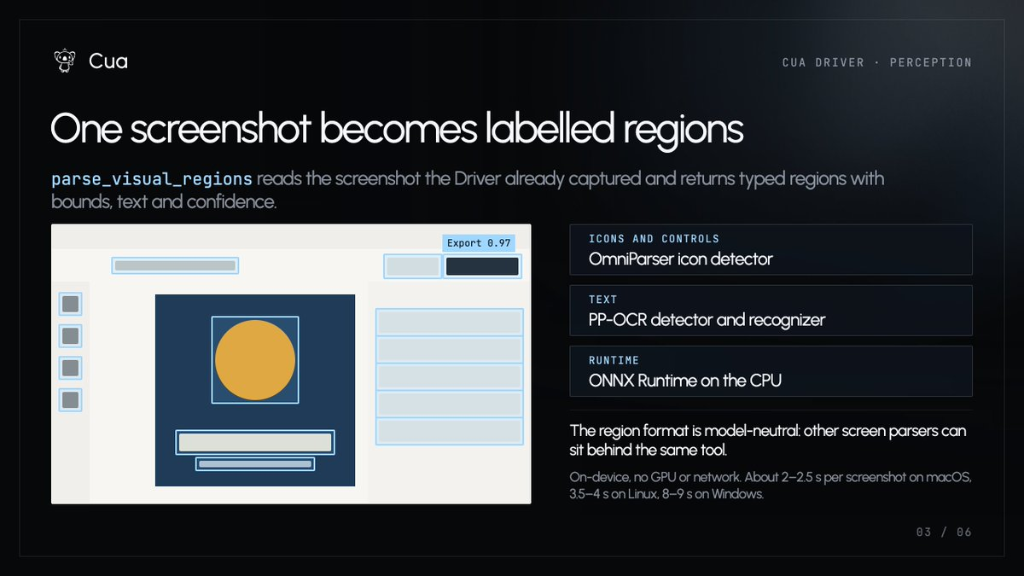
Cua Perception decouples visual parsing from cognitive decision-making. Instead of asking a reasoning model to perform spatial regression, the driver invokes a dedicated, local tool called parse_visual_regions. This tool runs directly on the host CPU using ONNX Runtime, converting raw pixels into an enumerated candidate action list before any reasoning model sees the task.
| Pipeline Component | Underlying Model | Execution Target | Output Data Contract |
|---|---|---|---|
| Icon & Control Detection | Microsoft OmniParser | ONNX Runtime (CPU) | Bounding boxes, component type, interactable confidence score |
| Text & Label Extraction | PP-OCR (PaddleOCR) | ONNX Runtime (CPU) | OCR text tokens mapped inside or adjacent to control boxes |
| Action Discretization | Cua Driver Parser | Host Memory Buffer | Discrete IDs (c01, c02, c05) tied to ephemeral capture leases |
By pairing OmniParser with PP-OCR inside a single local pass, Cua Perception constructs a structured, typed catalog of the screen. The model receives a discrete menu rather than a raw bitmap:
# Discrete candidate menu emitted by parse_visual_regions
{
  "capture_id": "cap_7f3a9c",
  "expires_in_seconds": 60,
  "candidates": [
    {"id": "c01", "type": "tool_button", "text": "Pen", "bounds": [12, 40, 36, 64]},
    {"id": "c02", "type": "action_button", "text": "Share", "bounds": [800, 10, 860, 40]},
    {"id": "c03", "type": "label", "text": "Title", "bounds": [120, 12, 240, 38]},
    {"id": "c04", "type": "dropdown", "text": "100%", "bounds": [450, 10, 510, 40]},
    {"id": "c05", "type": "action_button", "text": "Export", "bounds": [720, 180, 810, 220]},
    {"id": "c06", "type": "tool_button", "text": "Fill", "bounds": [12, 70, 36, 94]}
  ]
}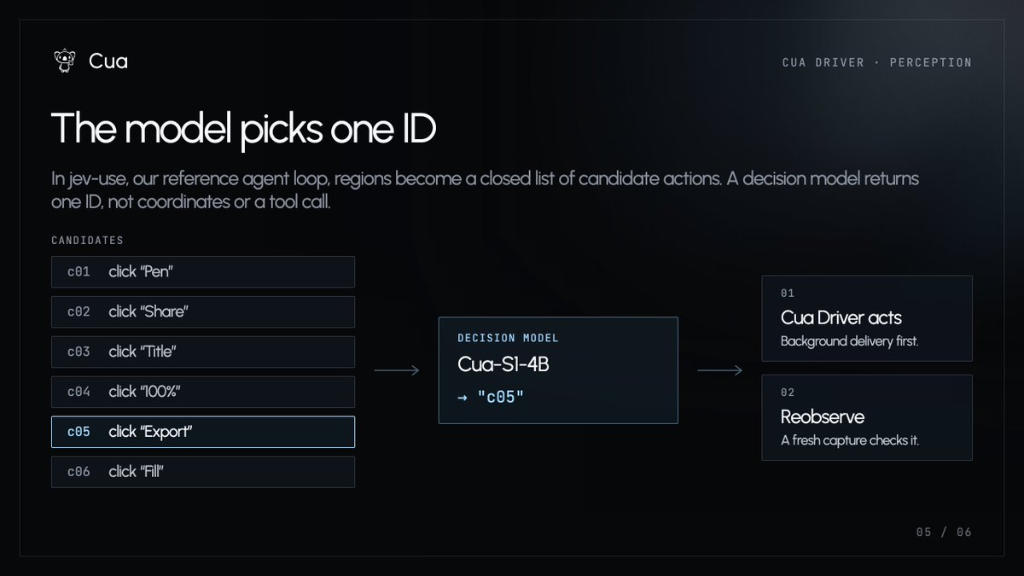
In Cua’s reference agent harness (jev-use), the decision model does not generate geometric coordinates or structured tool arguments. It returns a single discrete token: "c05". The driver receives the selection, looks up the corresponding bounding box internally, and calculates the exact geometric midpoint for execution. Spatial math is removed entirely from model inference.
State Leases: Defensive Guarantees Against Ghost Clicks
The most consequential design choice in Cua Perception is its rejection of coordinate fallbacks. In standard computer-use harnesses, when an agent fails to ground an element through semantic hooks, it defaults to a blind coordinate click. In production environments, blind clicks cause catastrophic state corruption: closing background windows, submitting half-filled forms, or clicking stale positions during UI updates.
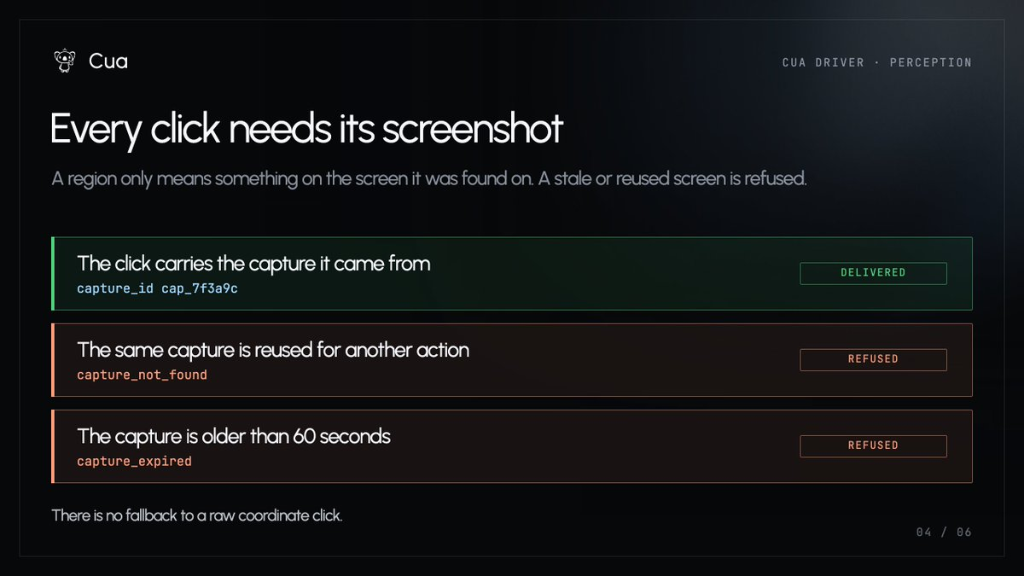
Every capture ID is single-use. Once an action dispatches against cap_7f3a9c, the lease is consumed immediately. If an agent attempts to batch two clicks against a single capture, the second invocation halts with capture_not_found. If a model pauses to deliberate and exceeds 60 seconds, the driver rejects execution with capture_expired.
Crucially, there is zero fallback to a raw coordinate click. If the capture has expired or the target identifier cannot be resolved, the driver returns an explicit error condition. This forces the agent loop to re-observe the window through a fresh capture before issuing subsequent commands, eliminating UI desynchronization at the protocol boundary.
Unlocking Compact Models for Desktop Automation
Because discrete action selection requires zero visual pre-training or coordinate regression, desktop operation is no longer restricted to multi-hundred-billion parameter frontier models. Compact, highly specialized reasoning models can operate complex interfaces with high precision.
In Cua’s published loop, decision-making is delegated to Cua-S1-4B, a 4-billion parameter model. Given an enumerated list of candidate elements, a 4B parameter model matches user intent to labeled UI options without spatial confusion. Developers can run high-throughput computer-use agents entirely within local infrastructure: an ONNX CPU perception pass combined with a quantized local model (such as Qwen 2.5 3B or Llama 3.2 3B via Ollama) completes full desktop loops without external API credentials or vision token consumption.
Hardware Latency Profile and Architecture Constraints
Local CPU inference eliminates cloud network latency and cloud API costs, but shifts the computational load to host CPU vector units. Because OmniParser and PP-OCR run on CPU threads via ONNX Runtime without requiring dedicated GPU VRAM, performance depends directly on CPU architecture and SIMD instruction support:
| Host Platform Architecture | Observed Parse Latency | Operational Trade-off |
|---|---|---|
| macOS (arm64 / Apple Silicon) | 2.0 – 2.5 seconds | Hardware-accelerated NEON vector pipelines match or exceed cloud round-trip speeds. |
| Linux (x86_64) | 3.5 – 4.0 seconds | Acceptable for server-side headless orchestration across containerized virtual displays. |
| Windows (x86_64) | 8.0 – 9.0 seconds | Constrained by threading overhead in Windows ONNX CPU backends; best suited for background batch jobs. |
While an 8 to 9-second latency on Windows x64 is prohibitive for real-time interactive tasks, it remains a workable trade-off for asynchronous, long-running back-office automations where privacy invariants prevent sending screenshots outside the firewall.
Licensing Isolation: Keeping Core Runtimes Enterprise-Clean
Enterprise adoption of open-source agent tooling frequently founders on copyleft software licenses. Microsoft’s OmniParser is distributed under the AGPL-3.0 license, which imposes reciprocal source disclosure obligations on network-deployed applications. If the Cua Driver had bundled OmniParser directly into its core binary, the entire project would inherit AGPL obligations, restricting its use in proprietary enterprise software.
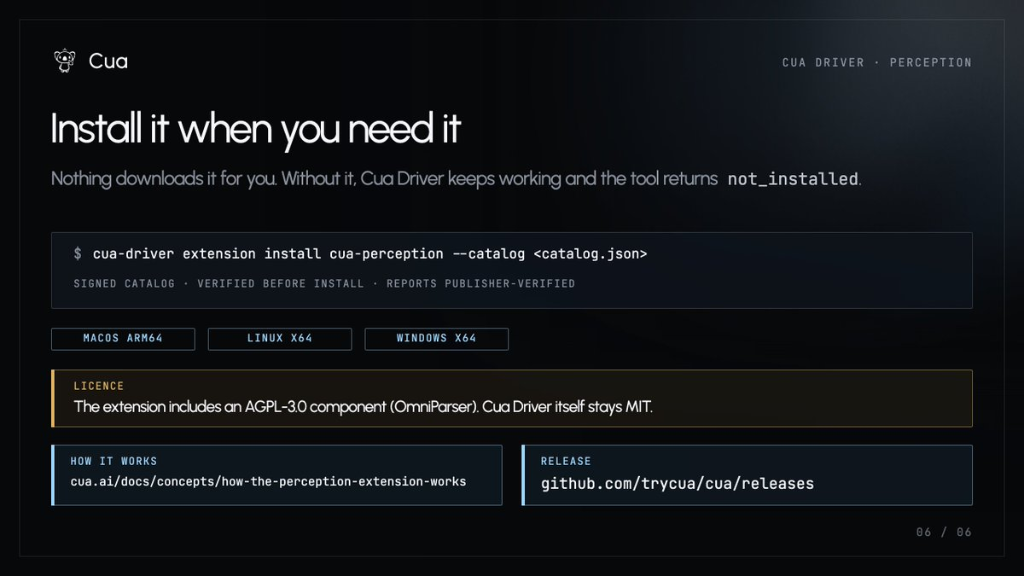
Cua resolved this dependency conflict through an isolated extension boundary:
# Install the optional Perception extension from a verified catalog
$ cua-driver extension install cua-perception --catalog <catalog.json>

# Verified Output:
# SIGNED CATALOG • VERIFIED BEFORE INSTALL • REPORTS PUBLISHER-VERIFIED
The base Cua Driver remains licensed under the permissive MIT license. Nothing downloads automatically; if an agent requests visual parsing on an installation lacking the extension, the driver returns a clean not_installed state. Organizations requiring strictly permissive licensing can use Cua Driver across native accessibility trees without AGPL-3.0 exposure, while deployments that require canvas fallbacks opt into the signed binary extension explicitly.
Frequently Asked Questions
Does Cua Perception require a GPU to run?
No. Both OmniParser and PP-OCR are converted to ONNX format and executed on the host CPU via ONNX Runtime. The extension does not allocate dedicated GPU VRAM, allowing it to run alongside local models without causing CUDA out-of-memory errors.
Can Cua Perception operate without an internet connection?
Yes. Once the signed extension is installed locally, visual parsing executes 100% on-device. No screenshots, pixel buffers, or extracted OCR text tokens are transmitted to external APIs or remote servers.
What happens if a UI element moves before the agent clicks?
Cua Driver rejects the action. Because each click must reference a valid, unexpired capture_id (< 60 seconds) that can only be consumed once, any stale or reused capture returns capture_not_found or capture_expired. The driver prohibits blind coordinate fallbacks, requiring the agent loop to take a fresh capture.