
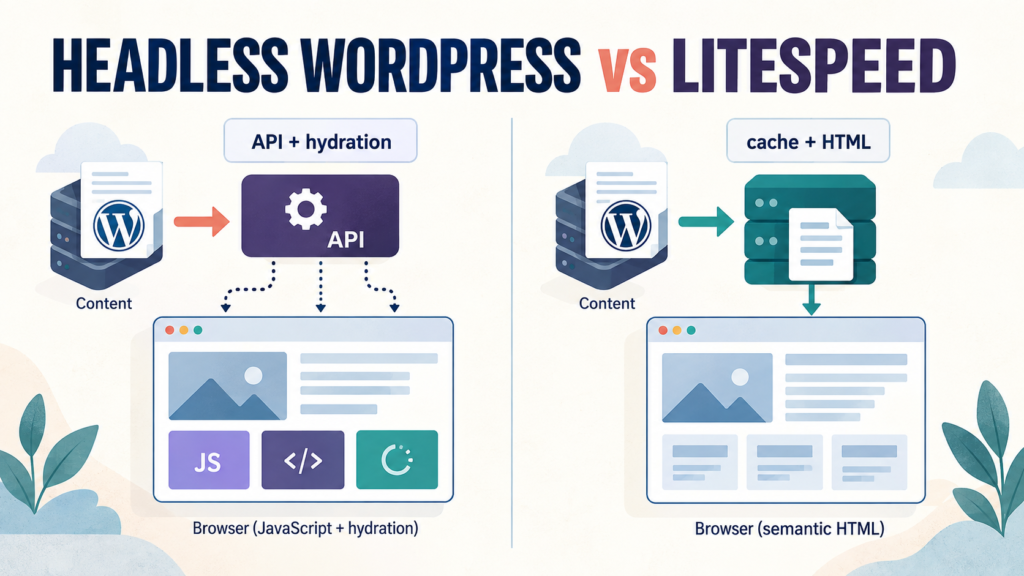

Headless WordPress and LiteSpeed solve different problems. Headless WordPress gives a team a separate front end, API boundary and application workflow. WordPress served through LiteSpeed keeps the publishing path simpler and can cache complete HTML close to the reader. Neither architecture automatically wins Core Web Vitals. The result depends on cache hit rate, JavaScript sent to the browser, image delivery, hosting distance, personalization and the interactions the page actually supports.
Headless WordPress vs LiteSpeed is a deployment choice, not a universal performance ranking. This guide is for publishers deciding whether to decouple WordPress or tune the stack they already have. It replaces architecture slogans with a measurement plan: define the page types, record field and lab data, inspect the browser payload, then choose the smallest system that meets the product requirements.
What the comparison really means
“Headless WordPress” describes WordPress used as a content system while another application renders the public site, often with Next.js, Astro or a similar framework. “LiteSpeed WordPress” describes a conventional WordPress front end served by LiteSpeed Web Server and, commonly, LiteSpeed Cache for WordPress (LSCWP).
That is not a fair comparison between a fast and a slow product. It is a comparison between two delivery paths:
- Headless path: content API or build pipeline → front-end render or static output → browser JavaScript for any client interaction.
- Cached WordPress path: WordPress request → page cache or origin → semantic HTML, CSS and only the JavaScript the page needs.
A well-built headless site can ship very little client JavaScript. A poorly configured monolith can ship too much. The architecture sets the available control points; measurement tells you where the cost is.
What the official documentation supports
Google describes Search processing as crawling, rendering and indexing. It says JavaScript pages can be rendered, but also recommends server-side or pre-rendering because it makes pages faster for users and crawlers and because not every crawler executes JavaScript. That supports a practical rule: put the article text, links, headings and metadata in the initial HTML whenever the page does not need client rendering.
Next.js documents that App Router pages and layouts are Server Components by default. Server Components can fetch data, stream UI and reduce the JavaScript sent to the browser; Client Components are for state, event handlers and browser APIs. A headless build therefore needs a deliberate client boundary rather than a blanket assumption that every component must hydrate.
LiteSpeed’s own documentation says LSCWP can cache full pages and supports Edge Side Includes (ESI), which “punch holes” in a cached page for private, public or uncached fragments. The same documentation also warns that ESI has a cost and should be enabled only when its benefit outweighs the assembly overhead. Those boundaries matter more than a vendor’s headline latency claim.
The documentation proves how the systems are designed. It does not prove that one site will record a particular TTFB, INP, cost or crawl rate. Those are properties of a deployment and must be measured on the real URL, with the real theme, plugins, images, cache state and audience.
Core Web Vitals: the metrics to measure
Core Web Vitals are field metrics, not architecture labels. For responsiveness, web.dev defines INP as the latency of interactions throughout a visit. At the 75th percentile, INP at or below 200 milliseconds is good, above 200 and at or below 500 milliseconds needs improvement, and above 500 milliseconds is poor. That threshold is useful, but a single lab run cannot establish a site’s field status.
| Metric | What to ask | Common architecture lever |
|---|---|---|
| INP | Does the page respond quickly after taps, clicks and keyboard input? | Reduce long JavaScript tasks and keep interactive islands small. |
| LCP | How quickly does the main article image or heading appear? | Cache the response, prioritize the real hero asset and avoid render-blocking work. |
| CLS | Does content move while fonts, media or embeds load? | Reserve dimensions and keep ad, image and embed boxes stable. |
| TTFB | How long until the first response byte arrives from the chosen region? | Use a nearby cache, efficient origin work and a measured invalidation strategy. |
TTFB is a diagnostic signal rather than a promise that the page is usable. A fast first byte can still be followed by a large JavaScript payload, a slow hero image or an interaction blocked by a long task. Conversely, a page with a modest origin response can still feel good when it delivers stable HTML and little client work.
Where headless WordPress helps
Headless is a sensible choice when the front end is genuinely an application or when one content source serves several products. Examples include a web and mobile application sharing the same content contract, an authenticated product with complex client state, multiple regional experiences with separate release pipelines, or a team that needs a front end independent from WordPress operations.
It also creates useful boundaries. The content API can be secured separately, the front end can be deployed with a static or incremental strategy, and interactive components can be isolated as Client Components. The performance win appears when those boundaries reduce work at request time and in the browser, not merely because a framework name was added.
Headless fit test: choose it when the product requirement needs a separate application boundary. If the public page is mostly articles, categories, author pages and search-friendly links, first ask whether decoupling solves a problem the reader can actually feel.
Where cached WordPress with LiteSpeed helps
A conventional WordPress site keeps editing, preview, templates, taxonomy, comments and the public rendering path in one system. When a page is cacheable, the server can return a stored response without repeating WordPress and database work for every reader. LSCWP also offers purge hooks, object-cache integration and ESI for selected dynamic fragments.
This is attractive for a technical publication because article pages are often public and change less frequently than an application screen. Editors get a short path from draft to preview to publication, while readers receive ordinary HTML links and content that is available before optional JavaScript runs.
It is not a free pass. A plugin can add expensive queries or front-end scripts. A cache can be bypassed by cookies or query strings. ESI can add assembly work. A theme can create layout shift. LiteSpeed must be measured as a configured system, not credited for numbers that have not been observed.
Head-to-head decision matrix
| Decision area | Headless WordPress | WordPress + LiteSpeed |
|---|---|---|
| Publishing workflow | Requires preview, build, webhook and cache invalidation design. | Usually a shorter editor-to-public path. |
| Browser work | Can be very small with Server Components and selective hydration. | Depends on the theme, plugins and optimization settings. |
| Personalized fragments | Often handled in the application or after load. | Can use ESI, private cache or an uncached path where appropriate. |
| Operational complexity | Two systems, two releases and more failure points. | Fewer moving parts, with WordPress and plugin maintenance still required. |
| Best default | Application-like products and multi-channel content platforms. | Content-led sites where editorial speed and complete HTML matter. |
A measurement workflow that produces a defensible answer
The useful output is a comparison record another engineer can reproduce. Test the same URL, content, image set, viewport, network profile, region and cache state in both architectures.
- Choose representative templates. Include an article, category archive, search result and any page with personalization. Do not benchmark only the home page.
- Define cache states. Record cold origin, warm public cache, logged-in or cookie-bypassed request and invalidation after an edit.
- Capture field data. Use CrUX or the site’s real-user monitoring where available. Segment mobile and desktop; record the period and sample size.
- Capture lab data. Run repeated Lighthouse or WebPageTest tests from a named region and device profile. Report median and spread instead of the best run.
- Inspect the browser. Record transferred bytes, JavaScript execution time, long tasks, image priority, layout shifts and the request waterfall.
- Test publication and purge. Update one article, publish it, request it from a clean session and verify how quickly the new title, image and internal links appear.
- Record total operating work. Include build minutes, preview failures, cache incidents, plugin maintenance, monitoring and the people needed to keep both paths healthy.
Do not publish a synthetic benchmark as a site-wide truth. “This run recorded 280 ms INP on a Moto profile” is reproducible. “Headless fails INP” is a generalization that needs field evidence across the sites and interactions being discussed.
Implementation checklist for a cached WordPress site
- Measure the public page before changing settings.
- Remove plugins and widgets that add work to every page.
- Serve correctly sized responsive images and reserve their dimensions.
- Keep article text, headings, canonical links and navigation in server-rendered HTML.
- Use page cache for public pages and verify cache hits with response headers.
- Enable ESI only for fragments that justify separate cache handling; document their TTL and purge behavior.
- Keep comments, account controls and personalized elements out of the public cache unless their privacy boundary is understood.
- Test after every theme, plugin, font, analytics or ad change.
Implementation checklist for a headless WordPress site
- Render article content and metadata on the server or at build time so the initial response is useful.
- Use Client Components only where browser state or event handlers are required.
- Set a preview contract that editors can trust before publication.
- Make webhook retries and cache invalidation observable; a failed webhook should not leave stale content silently.
- Generate canonical URLs, XML sitemaps, feeds and structured data from one source of truth.
- Measure the JavaScript actually shipped to an article route, including third-party scripts.
- Keep API failures visible in monitoring and provide a useful error page when the content origin is unavailable.
Readable code example: test the page, then compare the record
The following shell workflow is intentionally small. It records a URL and timestamp for repeated lab runs; the result is only useful when the environment is kept consistent. Use the resulting report alongside field data rather than presenting it as a universal architecture score.
#!/usr/bin/env bash
set -euo pipefail

URL="${1:?pass a URL}"
OUT="${2:-web-vitals-$(date -u +%Y%m%dT%H%M%SZ).json}"

npx lighthouse "$URL" \
  --preset=perf \
  --form-factor=mobile \
  --screenEmulation.mobile=true \
  --output=json \
  --output-path="$OUT"

echo "Saved $OUT"
echo "Repeat this with the same URL, device profile, region and cache state."
For a serious comparison, keep the raw JSON, test date, commit or theme version, cache state and deployment region with the report. This is the same evidence discipline used in EyesTech’s reasoning-token cost audit: a metric becomes useful only after its denominator and boundary are visible.
SEO and discoverability: what actually matters
A headless build does not receive a ranking bonus for being headless, and LiteSpeed does not guarantee rankings. Search visibility depends on crawlable links, useful content, correct status codes, canonicalization, structured data where appropriate, page experience and the site’s reputation. Google’s JavaScript guidance says the initial HTML matters because crawling extracts links before rendering, while rendering can occur later and may take longer.
For a technical publication, the safest pattern is simple: make the article readable in the server response, use ordinary <a href> links for related work, keep the title and author information visible, and treat JavaScript as an enhancement. Our AI SDK change-tracking workflow shows the same principle in content research: preserve sources, methods and correction paths so readers and other systems can audit the claim.
The EyesTech publishing workflow
Our publishing architecture desk follows five checks before making a performance claim:
- Define: identify the page type, reader action and business requirement.
- Measure: capture field data, lab runs, payloads and cache state.
- Inspect: trace the slow request or interaction to a specific asset, query, script or deployment decision.
- Bound: separate the measured deployment from the general behavior of a framework or server.
- Publish: show the method, source links, limitations and a correction route.
That workflow is why this article does not repeat the draft’s unsupported claims of a universal 20× crawl advantage, a fixed 91.9% cost saving or a guaranteed INP result. Those values could be valid for a particular experiment, but the experiment record was not supplied. The honest next step is to run the comparison on the site and publish the raw conditions.
Verdict: choose the requirement, then verify the result
Choose WordPress with LiteSpeed when the site is content-led, public pages are cacheable and the team values a compact editorial workflow. Choose headless WordPress when a separate application front end, multiple channels or complex client state is a real product requirement. If both are viable, build the smallest representative page in each and compare field and lab evidence.
The performance question is not “Which architecture sounds modern?” It is “Which path delivers the required content and interactions with the least work for the reader and the team?” That question produces a decision that can survive a redesign, a new plugin, a new framework release and an independent review.
Frequently asked questions
Is headless WordPress faster than LiteSpeed WordPress?
Not by definition. A headless site can reduce server work with static or cached output, but it can also add API, build and browser work. A cached WordPress site can return complete HTML quickly, but plugins and theme scripts may erase that advantage. Measure both on the same page and conditions.
Does Google penalize headless WordPress?
There is no general headless penalty. Google documents crawling, rendering and indexing for JavaScript sites. The risk is implementation quality: missing initial content, non-crawlable links, rendering errors, slow delivery or incorrect metadata.
Does LiteSpeed guarantee good Core Web Vitals?
No. LiteSpeed can improve cache and response behavior, but INP, LCP and CLS also depend on JavaScript, images, fonts, embeds, third-party scripts and user interactions. Verify field data after configuration changes.
When should I use LiteSpeed ESI?
Use ESI when a mostly public page contains a small fragment that needs a different cache or privacy policy, such as a nonce or personalized widget. Document the fragment’s cache behavior and test the assembly cost. It is not automatically faster than returning a complete cached page.
Disclosure: This is an editorial methods guide from the EyesTech Publishing Architecture & Newsroom Systems Operations Desk. It was checked against the linked documentation on 14 September 2026. No universal benchmark, cost figure or crawl multiplier is asserted without a reproducible deployment record. Corrections follow the EyesTech editorial policy.