



While the world watches NVIDIA build data centers the size of small cities, a quieter revolution is happening on your desk.
For years, the narrative was simple: if you want to do serious AI work, you buy an NVIDIA GPU. The bigger the better. If you want to run the really big models — the Llama 3 70Bs, the Falcon 180Bs — you need enterprise-grade hardware that costs as much as a luxury car.
Then came Apple Silicon with Unified Memory Architecture (UMA).
And suddenly, a $4,000 Mac Studio could do something a $15,000 PC workstation couldn’t: run massive Large Language Models (LLMs) entirely in local memory. No cloud. No subscription. Just raw, local intelligence.
Here is why Apple’s Unified Memory is the unexpected savior of local AI.
The VRAM Bottleneck: Why Your RTX 4090 Weeps
To understand why Apple’s approach is revolutionary, you first have to understand the bottleneck.
LLMs are hungry beasts. They live and die by memory bandwidth and capacity. Every parameter in a model needs to be stored in high-speed memory (VRAM) for the GPU to access it quickly.
- A 7B model (like Mistral) needs about 4-5 GB of VRAM (quantized).
- A 70B model (like Llama 3) needs about 40-48 GB of VRAM.
- A 180B model (like Falcon) needs upwards of 100 GB.
The problem? Consumer GPUs hit a wall. Even the mighty NVIDIA RTX 4090 tops out at 24GB of VRAM. If you want to run a 70B model, you are out of luck. You simply cannot fit the model into the GPU’s memory. You would need multiple 4090s or an enterprise card like the A100 (80GB), which costs upwards of $15,000.
This is the “VRAM Wall.” And most local AI enthusiasts have been slamming their heads against it for years.
Enter Unified Memory: The Collaborative Brain
Apple’s solution wasn’t built for AI, but it turned out to be perfect for it.
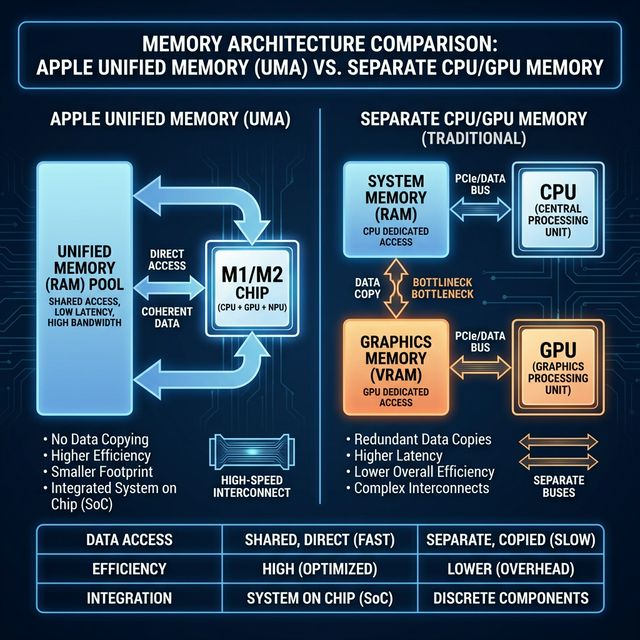
In a traditional PC, you have two pools of memory:
1. System RAM (DDR4/5) for the CPU (slow, massive capacity).
2. VRAM (GDDR6X) for the GPU (fast, tiny capacity).
Moving data between these two pools is slow. This is the PCIe bottleneck.
Apple Silicon (M1/M2/M3/M4 chips) uses a Unified Memory Architecture. The CPU and GPU share the same massive pool of high-speed memory.
- No Copying: The GPU can access data directly without waiting for it to be copied over a slow bus.
- Massive Capacity: You can configure a Mac Studio with up to 192GB of Unified Memory.
Think about that. 192GB of high-speed memory accessible by the GPU.
That is nearly 8x the capacity of an RTX 4090.
It means you can load a 120B parameter model — unquantized — directly into memory and chat with it in real-time. On a machine that sits quietly on your desk and draws less power than a lightbulb.
Performance vs. Capacity: The Trade-off
Now, let’s be real. Apple’s M-series chips are not faster than NVIDIA’s top-tier cards in raw compute.
If you are training a model from scratch, NVIDIA is still king. The tensor cores and CUDA optimization are unmatched for crunching numbers at scale.
But for inference (running the model to get answers), memory bandwidth is often the limiting factor.
The M2 Ultra manages memory bandwidth of 800 GB/s. While that is lower than an RTX 4090’s ~1,000 GB/s, it is high enough to be exceptionally usable.
- Scenario A (RTX 4090): You try to run a 70B model. It doesn’t fit. You have to offload layers to the system RAM (CPU). Performance tanks to 2-3 tokens per second. It’s unusable.
- Scenario B (Mac Studio M2 Ultra): You load the entire 70B model into Unified Memory. It fits comfortably. You get 15-20 tokens per second. It feels snappy and responsive.
For local LLMs, capacity is the new speed. It doesn’t matter how fast your GPU compute is if you can’t fit the model in memory.
The Economical Choice for Local AI
This brings us to the most surprising point: Apple is actually the budget option for high-end local AI.
To get 192GB of VRAM in the PC world, you would need:
– 4x RTX 4090 cards (96GB total) — complicated to set up, massive power draw.
– Or 2-3 NVIDIA A100 80GB cards — costing $30,000+.
A Mac Studio with M2 Ultra and 192GB RAM costs around $5,000 – $6,000.
For a developer, researcher, or privacy-conscious user who wants to run the absolute best open-source models (like How to Run LLMs Locally in 2025: The Complete Guide) without sending data to the cloud, the Mac is a no-brainer.
It’s ironic. The company known for the “Apple Tax” is providing the most cost-effective hardware for independent AI.
The Future of Local Intelligence
As models get smarter, they are also getting bigger (or at least, the state-of-the-art ones are). While optimizations like quantization helping squeeze models into smaller spaces, the thirst for VRAM is insatiable.
NVIDIA is focused on the data center (NVIDIA’s $5 Trillion Market Cap: How AI Made NVIDIA the Most Valuable Company). They want to sell H100s to Microsoft and OpenAI. They aren’t incentivized to put 128GB of VRAM on a consumer card.
Apple, unintentionally or not, has filled the void.
By unifying memory, they have democratized access to the highest tier of AI models. You don’t need a server rack. You just need a Mac.
So the next time someone laughs at gaming on a Mac, just show them your local Llama-3-70B instance running instantly, privately, and silently. They might change their tune.
Har Har Mahadev 🔱, Jai Maa saraswati🌺