

Our 40-second film test shows why Google Vids has a distribution advantage—and why the model still has to earn the headline.
Google Vids already combines short AI-generated clips, a scene editor, Google Drive, and familiar Workspace files in one place. That puts it close to a powerful default video tool: people can start from a document or slide deck, generate footage, edit it, and share it without learning a specialist production suite. Our 40-second film test exposed the remaining gap. Google needs a video model that follows detailed action prompts and keeps characters, objects, and camera logic consistent from shot to shot. The product is unusually well placed; the generated footage still needs a director.
The “one model away” line is a thesis, not a benchmark result or a claim that Google already leads every video model. Google said Vids had more than seven million monthly users in July 2026; that is the company’s own usage figure, not an independent market-share measurement. If a substantially better video model arrives inside the same familiar editor and Drive workflow, Google can put it in front of an enormous existing audience. Google Workspace’s Omni Flash announcement
Vids already has the distribution layer
Vids is Google’s browser-based video editor within its Workspace family. You can start with a blank canvas, a template, uploaded media, a recording, a Google Slides deck, or AI-assisted creation. Slides can become scenes; a newer workflow can turn DOC, DOCX, and PDF files into narrated summary videos. The editor organizes work into scenes and tracks for video, images, text, and audio. Projects can be shared for comments or editing, and finished videos can be exported as MP4s to Drive, a device, or YouTube. Google Vids getting-started guide · Document-to-video guide
The AI tools cover four clip operations: Create from a prompt and optional reference images, Animate a still image, Edit an existing video with a prompt, and Extend a generated clip. Google’s current guide lists clip durations of 3–10 seconds, landscape or portrait output, and 720p or 1080p options. Create accepts up to seven reference images. Its July 2026 Omni Flash announcement describes natural-language edits to lighting, backgrounds, product colors, camera angles, and visual style, as well as personal avatars for eligible accounts. AI clip guide · Omni Flash announcement
That combination matters. Google does not need every user to seek out a separate AI video website. Vids can show up beside the documents and presentations that employees already make. Google’s blog says Omni-generated video includes an imperceptible SynthID watermark. Plan, language, and administrator settings still determine who can use particular AI features.
Our test: one story, several generated shots
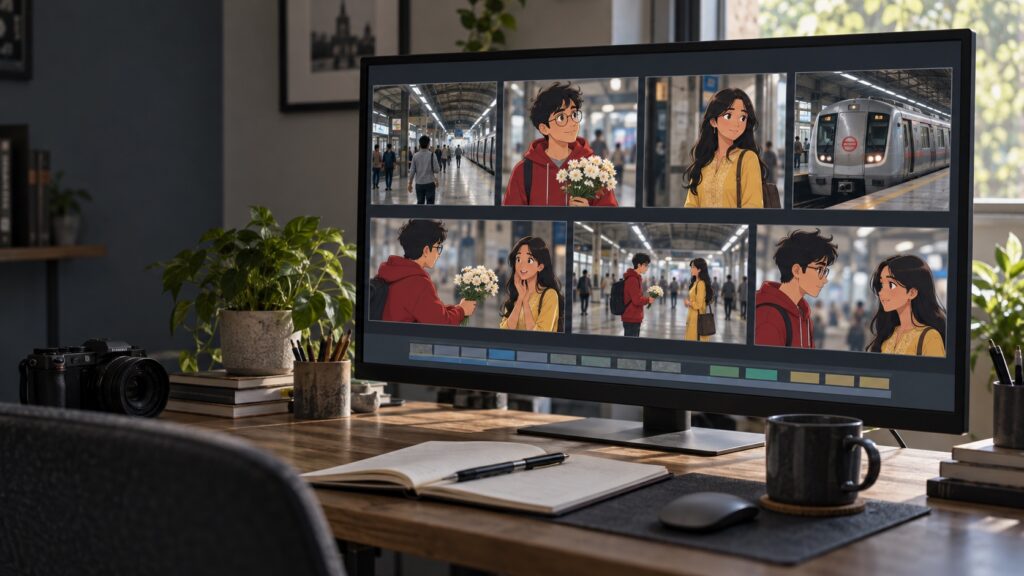
We built a hand-animated romance: a shy Indian boy in a red hoodie and glasses rushes out of an elevated metro station carrying white flowers and a confession note. A girl in a yellow kurta waits below. They exchange the bouquet and a glance; a train wipes across the scene; a dark card closes with “I Love You Aayushi” and “In Love We Believe.”
Here is the finished 40-second film, In Love We Believe:
We made reference images for the characters and station, then generated three 10-second 720p Omni clips: the boy rushing down the stairs, the meeting, and the confession. We arranged those shots, trimmed a train clip to five seconds, and timed a five-second outro card. The export is 40.03 seconds, with a 1920 × 1080 video stream. The new source clips were 720p; the larger export frame does not create detail absent from the source footage.
The hybrid style came through: the station felt grounded while the characters looked animated. The red hoodie and yellow kurta helped keep the leads recognizable. We used editable text for the final card, where spelling mattered. The note’s writing and the train’s destination display were not reliably legible in the frames we inspected.
We still had to choose takes, sequence scenes, trim the train shot, place the outro, and inspect the render. The exported file contains audio, but we did not verify that every requested spoken line came through exactly as scripted. Generated dialogue should be checked by listening to the finished MP4. Vids has separate voiceover and caption tools for that finishing pass. Voiceover guide · Captions guide
What the next model has to fix
Action obedience: the model has to perform the requested sequence, not just reproduce its mood. Running, reading a note, handing over flowers, and reacting may need separate shots; one prompt does not guarantee every beat.
Temporal consistency: a recognizable character in one clip should remain the same person, in the same clothes, holding the same objects, across changing camera angles. References helped our characters remain recognizable but did not lock every detail.
Directable duration: with generations currently described as 3–10 seconds, a longer story means chaining clips and managing the joins. The model must make continuations feel intentional, while the editor needs precise controls to trim and align them.
Exact text and sound: names, signage, dialogue, and sound cues need to land correctly. Until generation handles them reliably, text overlays, voiceover tracks, and captions remain essential.
These are model problems as much as editor problems. Vids already has a timeline, text overlays, voiceover tracks, captions, and export. Better prompt obedience and continuity would make that existing editor far more useful. Google’s Omni announcement shows the direction; it does not establish that long-form scene consistency is solved.
The free editor does not mean unlimited AI video
Google says basic Vids features are available with a personal Google Account. AI generation has monthly limits. As of September 2026, Google’s plan table lists these AI video allowances:
| Account | Listed AI video allowance |
|---|---|
| Personal Google Account | 6 clips per month, shared with preset avatar generations |
| Google AI Plus | 6 clips per month, shared with AI avatars |
| Google AI Pro | 500 generated seconds per month |
| Google AI Ultra 5x / 20x | 2,500 / 10,000 generated seconds per month |
| Workspace Business Starter | 200 generated seconds per month |
| Workspace Business Standard / Plus | 500 generated seconds per month |
Personal accounts also receive 50 monthly credits for certain other AI actions, including storyboard creation, voiceovers, and image actions. Workspace administrators can control access. Google’s separate clip guide still contains a generic “up to 50 videos per month” statement, while the plan table lists plan-specific clip or seconds limits. Check the current table before budgeting because Google says limits and features can change. Google Vids feature availability · AI clip guide
A 40-second story can consume a meaningful part of a seconds-based allowance, especially when reruns are needed to repair a face, gesture, or transition. Predictable iteration costs will matter if Vids is to become a routine creative tool. Google also lists a 30-minute project limit and up to 50 video and 50 audio objects per project. Vids storage and object limits
How to get better results
Write the story as short shots with one main action each. Establish characters in reference images, then repeat key details such as clothing, props, lighting, and style. Describe camera movement separately from character behavior. Inspect every generated clip before assembling the timeline. Add exact words as editable text, handle dialogue and music as a separate pass, and watch the exported MP4 from beginning to end.
The opportunity is real; the lead is still unproven
Google Vids is unusually well positioned to turn a stronger video model into a mainstream creation workflow. It connects generation to documents, slides, editing, collaboration, and export. Google has a route to distribution that a standalone model demo does not.
But “one model away” is conditional. The next model must improve action obedience, continuity across shots, useful duration, and audio without making generation quotas impractical. Our 40-second film showed both the potential and the distance: Vids supplied animated scenes, while people made the sequence coherent and the words exact. If Google closes those gaps inside this editor, Vids could become a default way to make short work videos. The evidence today supports the opportunity—not a claim that Google already rules video generation.
Frequently asked questions
Can Google Vids make a complete video from one prompt?
Vids can draft scenes and generate short clips from prompts. A polished multi-scene video still needs script review, clip selection, timeline editing, exact text and audio, and a final export check.
Is AI video generation unlimited on a free Google Account?
No. Basic Vids features are available with a personal Google Account, but Google lists six AI video clips per month shared with preset avatar generations. Paid plan limits vary and may be measured in generated seconds.
What is the maximum length of an AI-generated clip in Vids?
Google’s current AI clip guide lists durations from 3 to 10 seconds. Longer stories need multiple clips assembled in Vids, and continuity between those clips still requires review.